




9. Face and Eye Detection
09 Sep 2019 | Python
Detect Single Faces
import numpy as np
import cv2
image_c = cv2.imread('Trudeau.jpg')
image_g = cv2.cvtColor(image_c, cv2.COLOR_BGR2GRAY) # gray scale function.
#cvtColor <- means that change the color of image_c
cv2.imshow('Trudeau in Color', image_c)
cv2.imshow('Trudeau in Grayscale', image_g)
cv2.waitKey()
cv2.destroyAllWindows()
# get CascadeClassifier (trained model)
face_detection = cv2.CascadeClassifier('Haarcascades/haarcascade_frontalface_default.xml')
#path of our classifier
#cascade means that 소통하달
#haar is the developer of this
- CascadeClassifier.detectMultiScale(input image, Scale Factor , Min Neighbours)
- Scale Factor
- Specifies how much reduction takes place in the image size each time during pyramiding process.
- or 1.2, it means image is reduced by 20% each time it’s scaled.
- Min Neighbours
- Parameter specifying how many neighbours each candidate rectangle should have to retain it.
- set it to a number between 3 and 6.
- This parameter will affect the quality of the detected faces.
- Higher value results in less detections but with higher quality.
# The face classifier returns the region of interest in a tuple
# Two points: upper left and bottom right coordinates
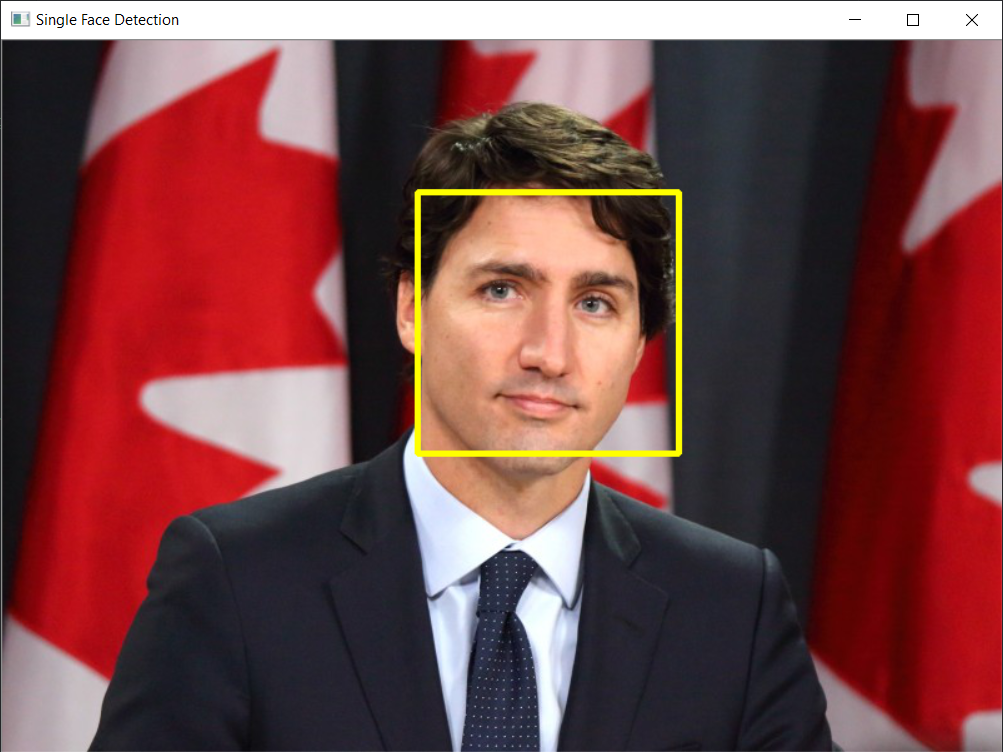
faces = face_detection.detectMultiScale(image_c, 1.1, 5)
# scale factor : sacle our image like smaller or large scale. like each point reduce
# 사진들을 픽셀로 쪼개서 얼굴을 인식 한다.
# min neighbors that detect around face "5" times
faces.shape
# (1, 4)
faces # coordinate of face, pixel of face loacated
# 332 x , 121 y , (208, 208) <- retangle. size of the face
faces[:,1]
#[:,1] <- list in the 1
#[:,2] <- value list in the 2
x = faces[:, 0]
y = faces[:, 1]
w = faces[:, 2]
h = faces[:, 3]

cv2.rectangle(image_c, (x,y), (x+w,y+h), (0,255,255), 3)
#x,y is top left corner.
#w+x, y+h is the bottome of right corner
#(0,255,255) yellow color
# 3 is the thickness
cv2.imshow('Single Face Detection', image_c)
cv2.waitKey(0)

cv2.destroyAllWindows()
Detect Multiple Faces
image_c = cv2.imread('Scientists.jpg')
image_g = cv2.cvtColor(image_c, cv2.COLOR_BGR2GRAY)
cv2.imshow('Scientists in Color', image_c)
cv2.waitKey()
cv2.destroyAllWindows()

cv2.imshow('Scientists in GrayScale', image_g)
cv2.waitKey()
cv2.destroyAllWindows()
# get CascadeClassifier (trained model)
face_detection = cv2.CascadeClassifier('Haarcascades/haarcascade_frontalface_default.xml')
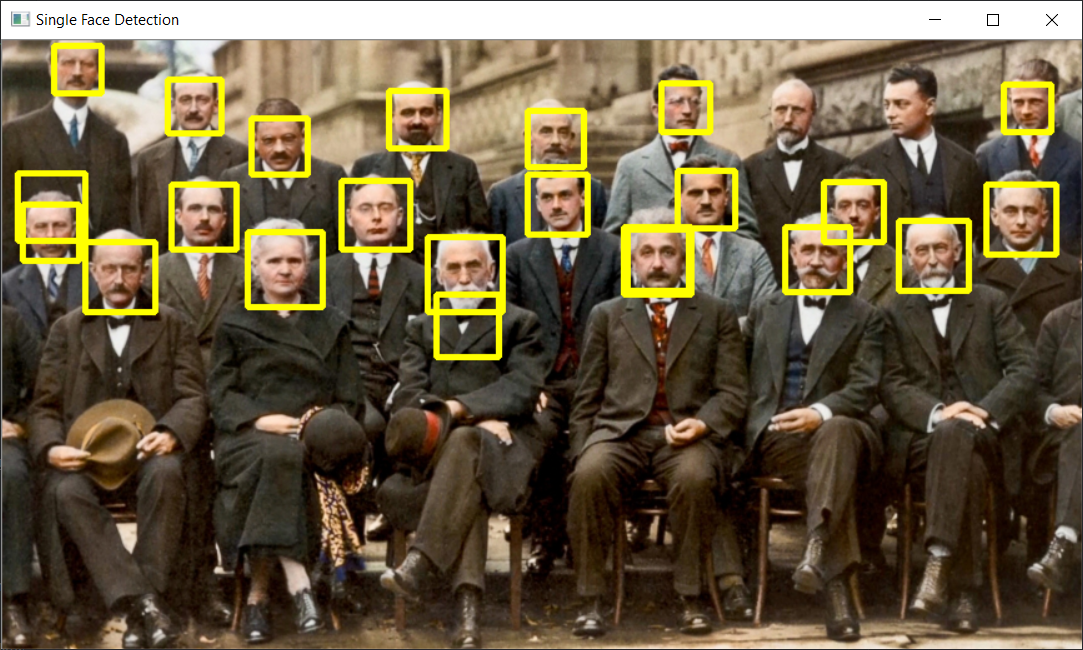
faces = face_detection.detectMultiScale(image_c, 1.1, 5)
faces
array([[ 15, 131,  46,  46],
       [ 42,   5,  37,  37],
       [626, 149,  52,  52],
       [196, 153,  59,  59],
       [340, 157,  60,  60],
       [ 66, 161,  57,  57],
       [717, 144,  56,  56],
       [496, 149,  55,  55],
       [347, 203,  50,  50],
       [540, 104,  46,  46],
       [420, 107,  48,  48],
       [272, 112,  55,  55],
       [658, 114,  47,  47],
       [ 12, 106,  54,  54],
       [132,  31,  43,  43],
       [527,  35,  38,  38],
       [801,  35,  38,  38],
       [134, 115,  53,  53],
       [787, 115,  56,  56],
       [309,  40,  46,  46],
       [420,  56,  45,  45],
       [199,  62,  46,  46]], dtype=int32)
for (x,y,w,h) in faces:
    cv2.rectangle(image_c, (x,y), (x+w,y+h), (0,255,255), 3)
    cv2.imshow('Single Face Detection', image_c)
    cv2.waitKey(0)
#valiable get value from per array each time for
cv2.destroyAllWindows()
Detect Eyes and Faces
image_c = cv2.imread('Trudeau.jpg')
face_classifier = cv2.CascadeClassifier('Haarcascades/haarcascade_frontalface_default.xml')
eye_classifier = cv2.CascadeClassifier('Haarcascades/haarcascade_eye.xml')
faces = face_classifier.detectMultiScale(image_c, 1.2, 5)

for (x,y,w,h) in faces:
    cv2.rectangle(image_c,(x,y),(x+w,y+h),(0,255,255), 3)
    cv2.imshow('Trudeau Face and Eyes',image_c)
    cv2.waitKey(0)

    # Select the face
    face_region = image_c[y:y+h,x:x+w]
    #y+h is hight of image
    #x+w width of my face

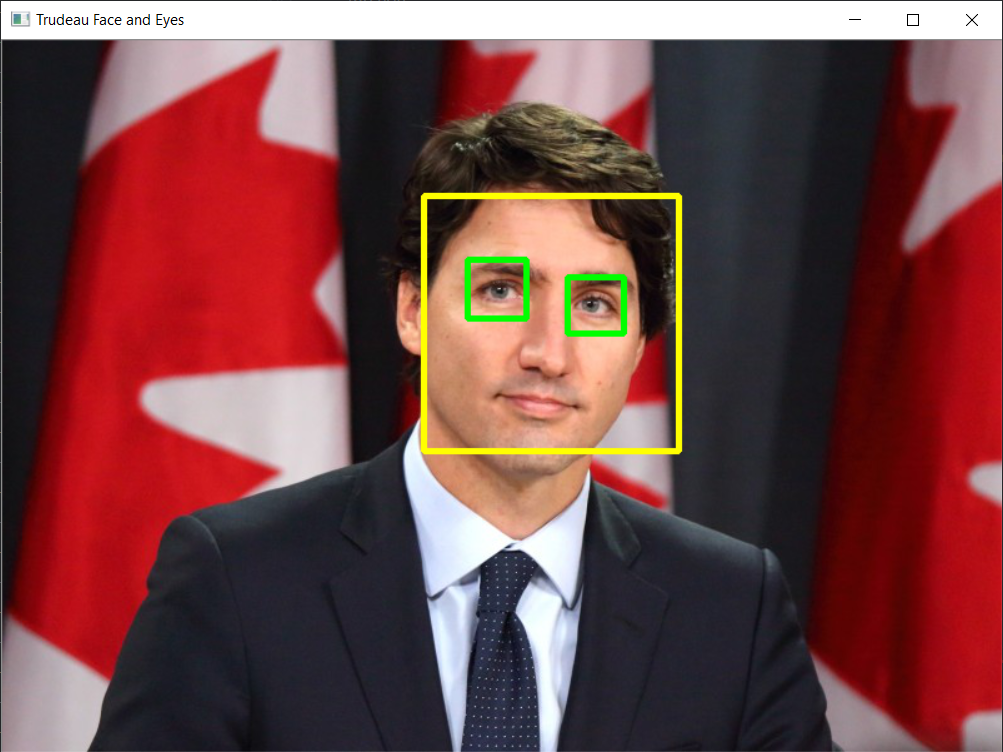
    eyes = eye_classifier.detectMultiScale(face_region)

    for (eyes_x, eyes_y, eyes_w,eyes_h) in eyes:
        cv2.rectangle(face_region,(eyes_x, eyes_y),(eyes_x + eyes_w, eyes_y + eyes_h), (0,255,0),3)
        cv2.imshow('Trudeau Face and Eyes',image_c)
        cv2.waitKey(0)

cv2.destroyAllWindows()
Detect Single Faces
import numpy as np
import cv2
image_c = cv2.imread('Trudeau.jpg')
image_g = cv2.cvtColor(image_c, cv2.COLOR_BGR2GRAY) # gray scale function.
#cvtColor <- means that change the color of image_c
cv2.imshow('Trudeau in Color', image_c)
cv2.imshow('Trudeau in Grayscale', image_g)
cv2.waitKey()
cv2.destroyAllWindows()
# get CascadeClassifier (trained model)
face_detection = cv2.CascadeClassifier('Haarcascades/haarcascade_frontalface_default.xml')
#path of our classifier
#cascade means that 소통하달
#haar is the developer of this
- CascadeClassifier.detectMultiScale(input image, Scale Factor , Min Neighbours)
- Scale Factor
- Specifies how much reduction takes place in the image size each time during pyramiding process.
- or 1.2, it means image is reduced by 20% each time it’s scaled.
- Min Neighbours
- Parameter specifying how many neighbours each candidate rectangle should have to retain it.
- set it to a number between 3 and 6.
- This parameter will affect the quality of the detected faces.
- Higher value results in less detections but with higher quality.
- Scale Factor
# The face classifier returns the region of interest in a tuple
# Two points: upper left and bottom right coordinates
faces = face_detection.detectMultiScale(image_c, 1.1, 5)
# scale factor : sacle our image like smaller or large scale. like each point reduce
# 사진들을 픽셀로 쪼개서 얼굴을 인식 한다.
# min neighbors that detect around face "5" times
faces.shape
# (1, 4)
faces # coordinate of face, pixel of face loacated
# 332 x , 121 y , (208, 208) <- retangle. size of the face
faces[:,1]
#[:,1] <- list in the 1
#[:,2] <- value list in the 2
x = faces[:, 0]
y = faces[:, 1]
w = faces[:, 2]
h = faces[:, 3]
cv2.rectangle(image_c, (x,y), (x+w,y+h), (0,255,255), 3)
#x,y is top left corner.
#w+x, y+h is the bottome of right corner
#(0,255,255) yellow color
# 3 is the thickness
cv2.imshow('Single Face Detection', image_c)
cv2.waitKey(0)
cv2.destroyAllWindows()
Detect Multiple Faces
image_c = cv2.imread('Scientists.jpg')
image_g = cv2.cvtColor(image_c, cv2.COLOR_BGR2GRAY)
cv2.imshow('Scientists in Color', image_c)
cv2.waitKey()
cv2.destroyAllWindows()
cv2.imshow('Scientists in GrayScale', image_g)
cv2.waitKey()
cv2.destroyAllWindows()
# get CascadeClassifier (trained model)
face_detection = cv2.CascadeClassifier('Haarcascades/haarcascade_frontalface_default.xml')
faces = face_detection.detectMultiScale(image_c, 1.1, 5)
faces
array([[ 15, 131, 46, 46],
[ 42, 5, 37, 37],
[626, 149, 52, 52],
[196, 153, 59, 59],
[340, 157, 60, 60],
[ 66, 161, 57, 57],
[717, 144, 56, 56],
[496, 149, 55, 55],
[347, 203, 50, 50],
[540, 104, 46, 46],
[420, 107, 48, 48],
[272, 112, 55, 55],
[658, 114, 47, 47],
[ 12, 106, 54, 54],
[132, 31, 43, 43],
[527, 35, 38, 38],
[801, 35, 38, 38],
[134, 115, 53, 53],
[787, 115, 56, 56],
[309, 40, 46, 46],
[420, 56, 45, 45],
[199, 62, 46, 46]], dtype=int32)
for (x,y,w,h) in faces:
cv2.rectangle(image_c, (x,y), (x+w,y+h), (0,255,255), 3)
cv2.imshow('Single Face Detection', image_c)
cv2.waitKey(0)
#valiable get value from per array each time for
cv2.destroyAllWindows()
Detect Eyes and Faces
image_c = cv2.imread('Trudeau.jpg')
face_classifier = cv2.CascadeClassifier('Haarcascades/haarcascade_frontalface_default.xml')
eye_classifier = cv2.CascadeClassifier('Haarcascades/haarcascade_eye.xml')
faces = face_classifier.detectMultiScale(image_c, 1.2, 5)
for (x,y,w,h) in faces:
cv2.rectangle(image_c,(x,y),(x+w,y+h),(0,255,255), 3)
cv2.imshow('Trudeau Face and Eyes',image_c)
cv2.waitKey(0)
# Select the face
face_region = image_c[y:y+h,x:x+w]
#y+h is hight of image
#x+w width of my face
eyes = eye_classifier.detectMultiScale(face_region)
for (eyes_x, eyes_y, eyes_w,eyes_h) in eyes:
cv2.rectangle(face_region,(eyes_x, eyes_y),(eyes_x + eyes_w, eyes_y + eyes_h), (0,255,0),3)
cv2.imshow('Trudeau Face and Eyes',image_c)
cv2.waitKey(0)
cv2.destroyAllWindows()
Comments